
TrySchedule - Free Online Schedule Builder

Free Online Schedule Builder

Create professional weekly schedules in minutes with a free online schedule builder. No signup required, no hidden fees—just open, drag your time blocks into place, and start planning.

Export a PNG or JPG image for free, ready to print or share. Pro adds PDF export, while the visual editor works for work, school, fitness, and anything in between.

How to build a weekly schedule in 3 steps

1

Click on the calendar grid to add time blocks for your activities. Drag to adjust times as needed.

2

Add colors and labels to organize your schedule. Switch between day and week view anytime.

3

Export your schedule as a PNG or JPG image for free. Pro users can export PDF files for printing.

Watch the tutorial

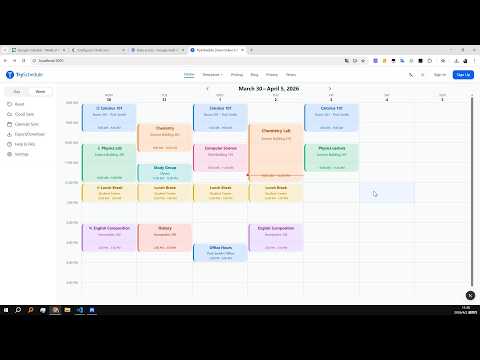
See the full workflow in action with a step-by-step video walkthrough for building and exporting your schedule.
How-to video thumbnail
Watch on YouTubeOpens in a new tab

Why plan your week visually?

👁️See your whole week at a glance. A proper schedule builder lays out every commitment visually, so you can instantly spot overlaps and balance work, study, and personal time without mental gymnastics.
🆓Completely free with no signup required. Many planning tools hide basic scheduling behind subscription walls, but this one gives you the full drag-and-drop experience at zero cost—no credit card, no trial period.
🎯Adapts to whatever you need to organize. Class timetables, shift rosters, workout plans, family chore charts—one tool handles them all, so you never need a separate app for each part of your life.
⬇️Export a finished schedule in seconds. Once the layout looks right, download a clean PNG or JPG ready to print, email to your team, or pin on the wall as a daily reference.

Who needs a weekly schedule?

👨‍🎓Students – plan class timetables and study sessions
👔Shift managers – build employee schedules and team rotations
💪Fitness enthusiasts – organize weekly workouts and routines
💼Freelancers – manage project schedules across multiple clients

Popular schedule templates

Jump into a ready-made template for study planning, AI scheduling, or employee shifts.

Schedule builder vs other planning tools

📊Vs Excel – TrySchedule wins on ease of use. Spreadsheets require manual formatting for any weekly plan, while this tool gives you drag-and-drop blocks, automatic color coding, and one-click export with zero formulas.
📱Vs calendar apps – TrySchedule wins on weekly structure. Calendar apps handle fixed dates well but struggle with recurring routines. It's built from the ground up to design your ideal week, not just list appointments.
📝Vs paper planners – TrySchedule wins on flexibility. Paper feels satisfying until one change forces you to cross everything out. With a digital planner you can move or recolor any block in seconds and always have a clean printable copy.
💵Vs paid software – TrySchedule wins on price. Premium tools cost $10 to $30 a month, but this tool is 100% free for building, editing, and exporting a weekly plan with no limits or upgrade prompts.

10 tips for getting the most out of a free online schedule builder

1Start with fixed commitments. Add work hours, classes, and appointments first, then fill flexible activities around those anchored blocks.
2Use color to separate categories. A color-coded schedule builder instantly shows how your week divides between work, study, fitness, and time off.
3Keep time blocks realistic. Overloading every slot leads to burnout, so leave a 10-minute buffer between activities to stay sane.
4Review your plan each week. Spend five minutes on Sunday planning ahead with this tool—priorities shift and your layout should shift with them.
5Batch similar tasks together. Group errands, admin work, and deep-focus sessions so the editor reflects natural workflow patterns instead of constant context switching.
6Export your final layout. Once your week looks right, download a high-quality PNG or JPG image and put it somewhere you will see every day.
7Share with your team or family. Export your schedule as a PNG or JPG image that anyone can open—no account needed, no logins required.
8Set one main goal before you start. Know what matters most this week, then use the tool to protect time for it and work backward from that priority.
9Leave white space on purpose. Keep 20 to 30 percent of your week unplanned so you can absorb surprises without blowing up the rest of your schedule.
10Switch things up each season. A routine that worked last semester may not fit now, so try fresh layouts until you find a rhythm that actually sticks.

Everything you need to plan your week

🔄Rated 4.7/5 by 526 users – drag-and-drop editor with color-coded blocks
⬇️Free PNG and JPG export, with PDF export in Pro
📋Flexible layouts for work, school, and personal use
☁️Free cloud save (up to 10 templates) and AI tools available in Pro

Frequently Asked Questions